
Packaging a project
#1
Packaging a project
Description
This tutorial explains how to package a SkyCAD project, which has the effect of including the project with all its dependencies (symbols and catalogue parts used) within a single package file, which can be opened by any other SkyCAD user in a read-only manner.
IMPORTANT: This method should not be used to share symbols/parts or collaborate on projects across different computers/colleagues. To do that properly, sharing your environment on a shared network/drive is recommended.
Topics covered
Package project, package, archive project, archiving.
Main content
This is very useful if you need to upload a project to the forum for assistance.
Here are the steps to follow:
Start by making sure the project you wish to package is open and selected in the tree view:

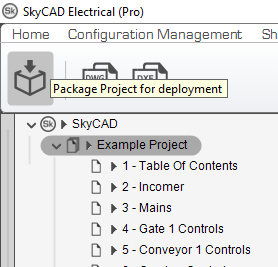
Click on the Import/Export tab, and select Package Project for deployment:
Select the location where you wish for the package file to be created and click Save:
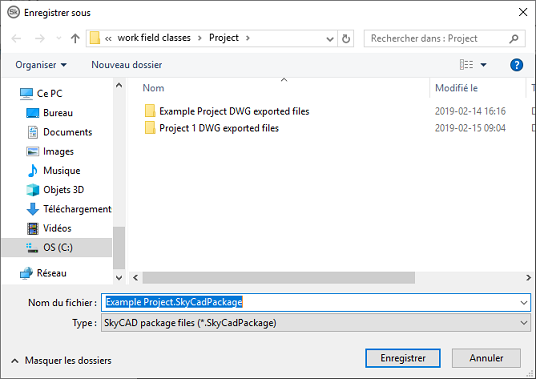
At this point, you should have a package file created, which can be opened by anyone who has SkyCAD installed on their computer.
Possible errors
When SkyCAD creates a package, it first creates a temporary folder on the computer and puts all the relevant files in there.
Once done, it creates a copy of that folder and converts it to a .skycadpackage file.
Then, SkyCAD tries to delete the temporary folder, which normally works fine, unless the SkyCAD environment is on a shared drive or server, in which case, SkyCAD doesn't have permission to delete files/folder from the shared drive or server (even if it was just a temp folder SkyCAD created in the first place).
The error message states "An error was encountered trying to delete the package temporary folder package file..."
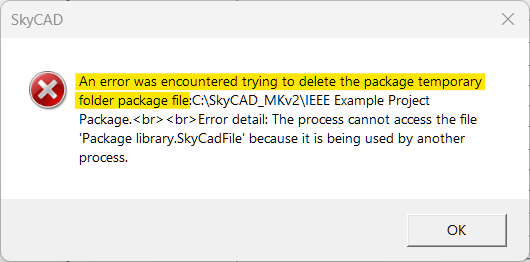
It's not an error with actually creating the package.
Simply delete the temporary folder, which you can find in the same folder as your Standard Environment folder.
The temporary folder will have the same name as the package file.
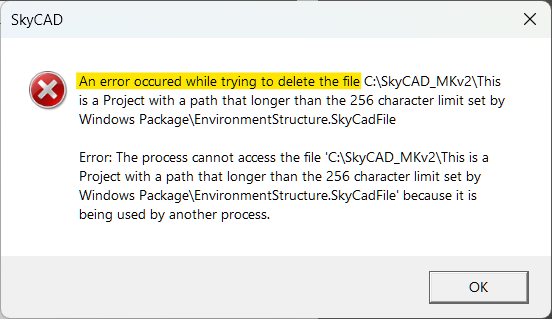
When packaging a project, if you get an error starting with "An error occurred while trying to delete the file..." it means the path to some of the files is longer than the 256 character limit set by Windows.
In this case, either:
- Temporarily rename your project to something shorter, then package the project
or - Do a Save As of the project to the root of your C drive