
#1
Importing parts to a google drive is not working
When I try importing parts on a google drive, I always get an error. If I copy the SkyCad environment to my local C drive and import the same part, it works. I then copy the environment back to google drive and everything works. But not able to import it straight to google drive.
Log in to post comments
#2
Hmmm...
Thanks for posting on the forum about that.
We'll check it out and see if we can reproduce that.
#3
Perhaps it's this...
The importing process requires you to have read-write access to the parent folder of 'Standard Environment', which in your case we guess may be the 'G:\' drive directly.
We guess your current environment path is simply 'G:\Standard Environment'.
If so, and if the G drive is the root of the Google drive, you might not have write access.
The workaround to this is to simply add something like 'G:\SkyCAD\' and place your environment there instead, so that your environment path is 'G:\SkyCAD\Standard Environment'.
Please let us know if you think this is the case or not.
#4
It is not working
The package was uploaded directly to G:\My Drive\SkyCAD Environments
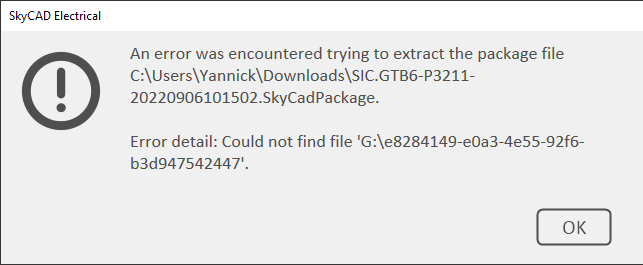
Below error pops.
PhilJ
Package was moved to G:\My Drive
Still:
#5
Hmmm...
Thanks for your feedback.
We'll have to dig deeper.
In the meantime, please do try the workaround the OP posted if you like.
#6
Workaround
Jeff,
what is the workaround?
#7
OP said in his original post:
OP said in his original post:
"If I copy the SkyCad environment to my local C drive and import the same part, it works. I then copy the environment back to google drive and everything works."
#8
ok
It works but takes some time. Not to count the concern of loosing a project or create an error due to the download to CDrive/change catalog/upload back to GDrive.
These are the taken steps:
#9
Thanks for the feedback.
Thanks.
We're looking into the problem.